Drawbly · Your ideas, in your own lines
API request flow
Follow one request, then trace the response back.
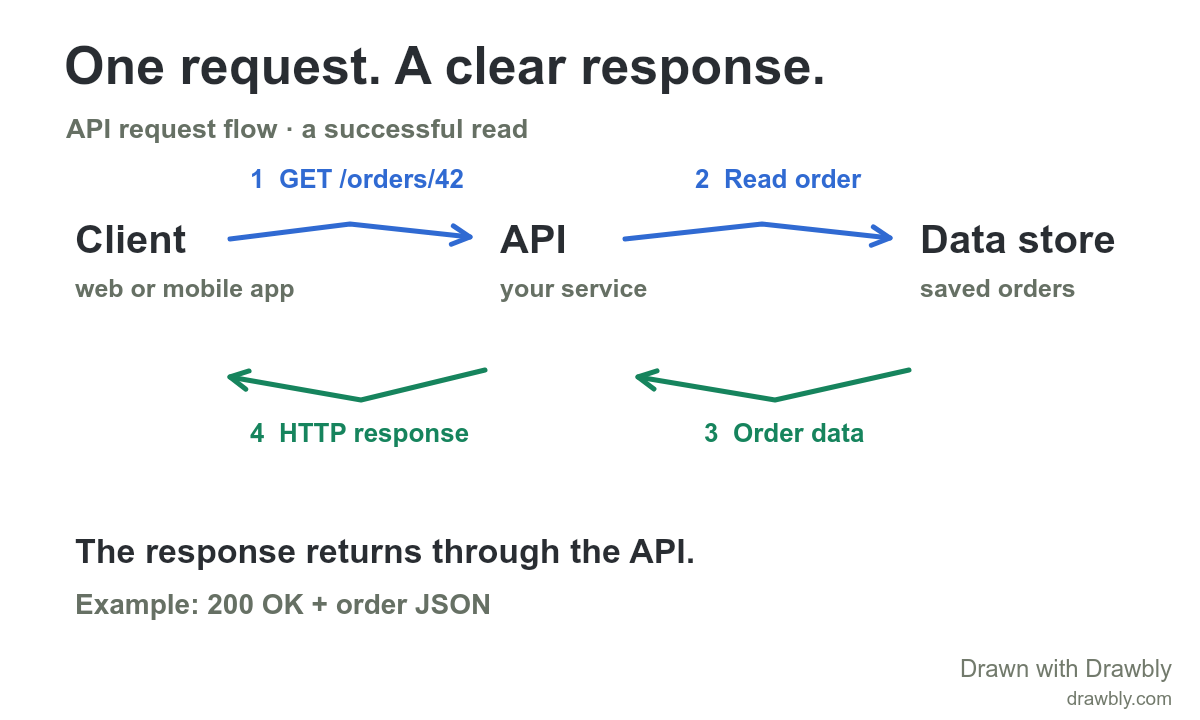
Make it fit your system.
- Rename Client, API and Data store to match your system.
- Replace GET /orders/42 with the request you want to explain.
- Add one error or timeout path only if it helps your audience.
Click Use this template to open the drawing. Choose Text to change a label, or Select to move a mark. If a drawing is already open, you can keep it or open the template with a recoverable copy.
Watch the explanation unfold.
Read the explanation
The client sends an HTTP request to the API. In this example, the API reads an order from its data store, then returns an HTTP response to the client. The database read is an internal operation, not another browser request. Authentication, errors and caching are omitted to keep this one path readable.
Reference: MDN: Overview of HTTP.
The drawing and supplied marks are editable example content. No account or cloud saving is required. Free exports include Drawbly credit.
Run the API request-flow example on GitHub. The public sample uses Node.js 22.14+, the downloadable Drawbly renderer kit and local FFmpeg with ffprobe to create a captioned MP4, preview PNG and editable drawing. It does not call a hosted AI service or upload your drawing.