Drawbly · Your ideas, in your own lines
RAG pipeline
Separate preparing the knowledge from answering a question.
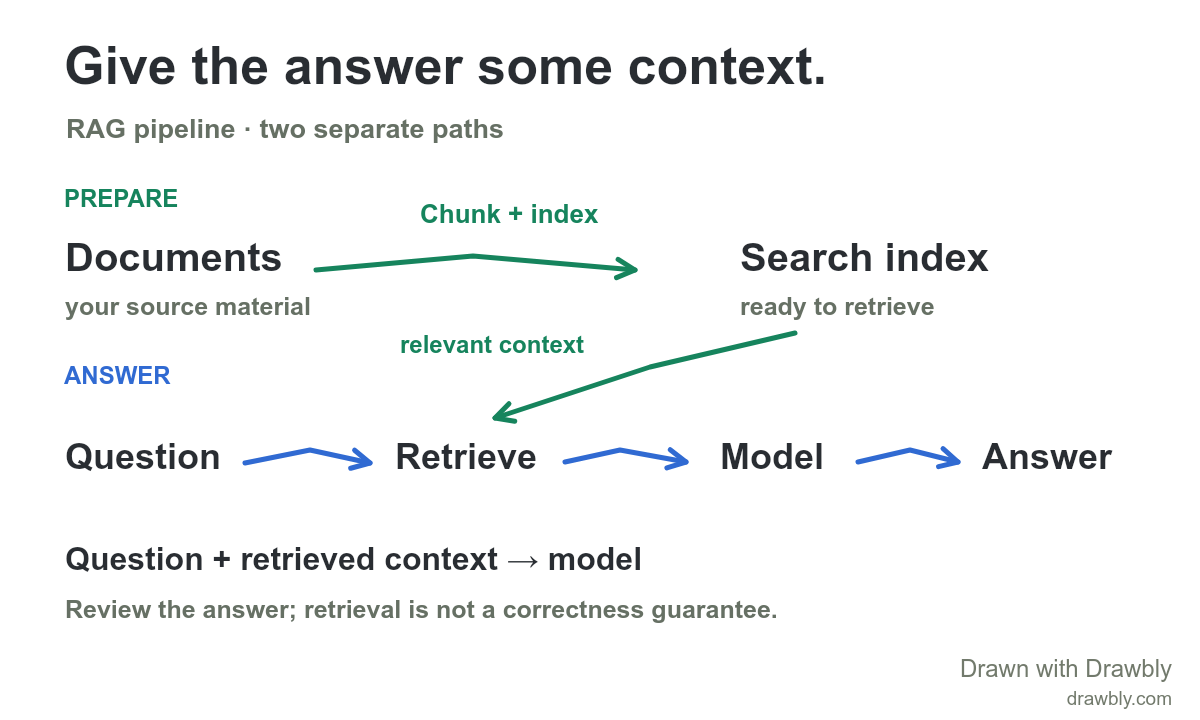
Make it fit your system.
- Rename Documents and Search index for your own knowledge sources.
- Add your retrieval method: keyword, vector or hybrid search.
- Label the checks or citations your application uses before showing an answer.
Click Use this template to open the drawing. Choose Text to change a label, or Select to move a mark. If a drawing is already open, you can keep it or open the template with a recoverable copy.
Watch the explanation unfold.
Read the explanation
Preparation divides source documents into useful chunks and adds them to a searchable index. At question time, retrieval selects relevant content and the application supplies it with the question to a language model. The model generates an answer using that context. Vector search commonly adds embeddings; keyword and hybrid retrieval are also possible. Retrieved material can improve grounding, but does not guarantee a correct answer.
Reference: Microsoft: Retrieval-augmented generation.
The drawing and supplied marks are editable example content. No account or cloud saving is required. Free exports include Drawbly credit.