 Drawbly
Technical explanations · Drawbly
How an AI agent uses a tool: the workflow in one diagram
By Drawbly ·
An agent is easiest to understand as a loop around one task. The model can choose a next step; the application decides which tools it may use and runs them. Here is the smallest useful version.
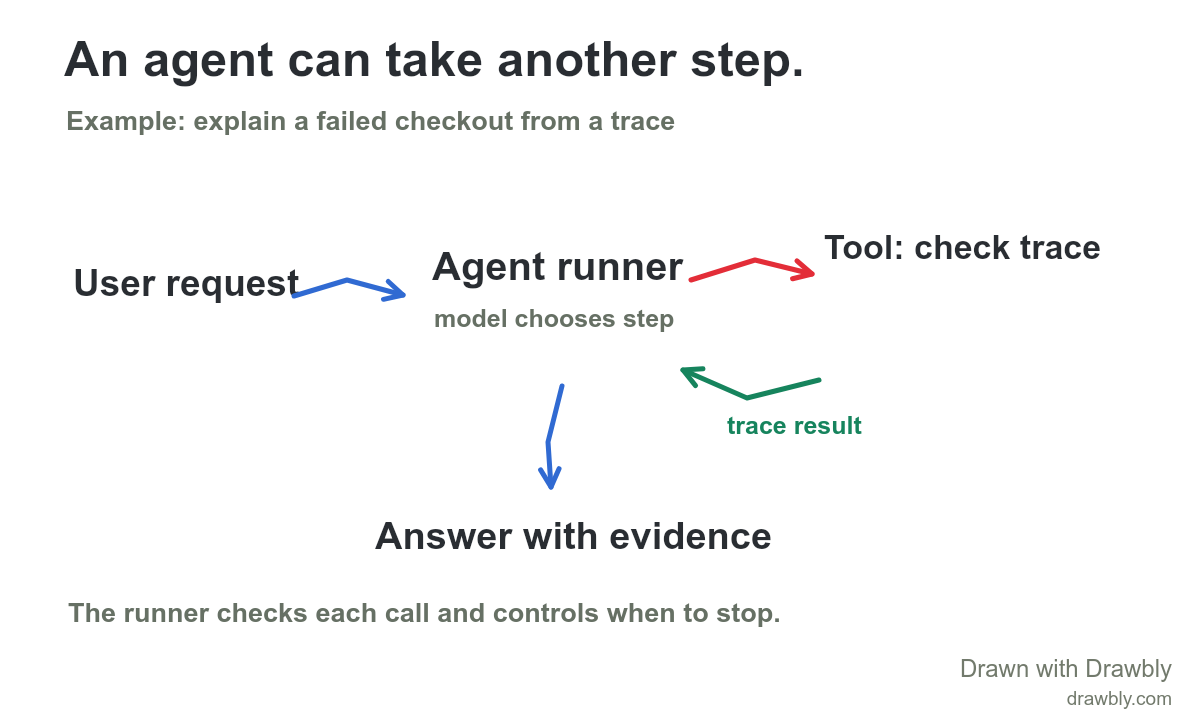
Walk the loop with one request
Suppose an engineer asks, “Why did checkout fail for this request?” An agent can inspect a trace, but only if the application has made a trace-reading tool available. The diagram has four things worth naming: the user request, the agent runner, the tool and the answer.
- Set the task and limits. The runner sends the model the question, instructions and available tool descriptions. It also holds limits such as which trace IDs can be read and how long the run may continue.
- Choose a next step. The model may answer, ask for more information or request a tool call. In this example it requests the trace for the failing checkout.
- Check and run the call. The application validates the tool name and arguments, applies permissions, then calls the trace service. The model does not bypass this application step.
- Return the result. The runner gives the trace result back to the model. The model can ask for another permitted step or finish with an answer tied to the evidence it saw.
A trace showing a slow database span is evidence for further investigation; it does not prove the database is the root cause. A good final answer says what the trace showed and what remains uncertain. For a task with side effects, add an explicit approval or permission boundary before the action tool.
When is it a workflow instead?
If your application always runs “read trace, summarize result, send response” in that order, the code determines the route. That is a fixed workflow. If the model can decide whether to inspect a trace, retrieve documentation or stop, it is directing part of the process. Anthropic's agent design guide makes this distinction and recommends starting with a simpler pattern when it can do the job.
For a predictable one-search answer over documents, a fixed RAG pipeline may be easier to test. Use an agent loop when a task genuinely needs choices based on intermediate results.
Draw your own agent workflow
Start with one user goal and one real tool. Label the point where your application checks the tool request, the result returned to the model and the condition that ends the run. Add a second tool only when you can explain why the first cannot handle that branch.
Use the editable agent workflow template to replace “check trace” with your actual tool. The example drawing is a conceptual map, not executable agent code or a claim that Drawbly runs an AI agent on your behalf.
Anthropic Engineering: Building effective agents explains fixed workflows, agent-directed tool use and when added complexity helps.