 Drawbly
Drawbly · Your ideas, in your own lines
AI agent workflow
See the loop between a model and the tools its application allows.
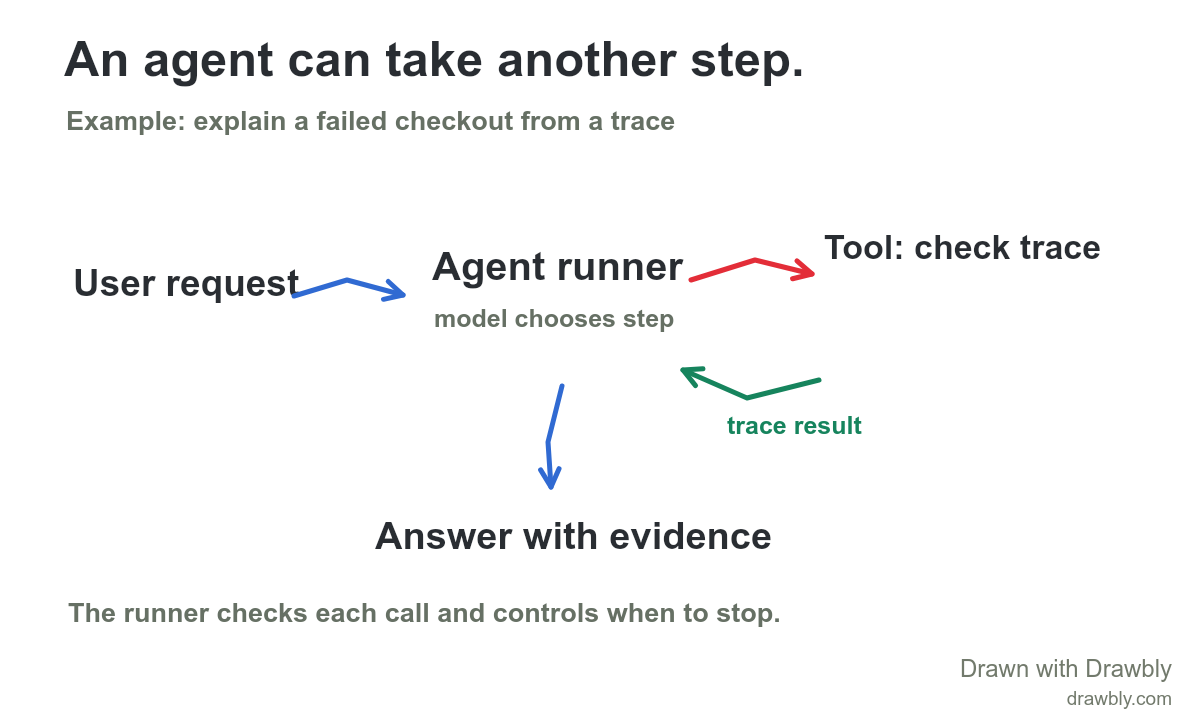
What this diagram shows
An application runs the agent. It gives the model a goal, instructions and available tools. The model can respond directly or request a tool call. The application checks and executes an allowed call, returns the result to the model and repeats until the model finishes or a limit is reached. An answer should identify which tool result supports its claim. This is a conceptual flow, not a particular provider API.
Follow a concrete tool call in How an AI agent uses a tool.
Make it fit your system
- Replace “Check a trace” with one real tool your application can call.
- Label what permission or argument check happens before the call.
- Add one failure or stop condition that matters for your task.
Click Use this template to open the drawing. Choose Text to change a label, or Select to move a mark. If a drawing is already open, you can keep it or open the template with a recoverable copy.
Watch the explanation unfold
Technical reference: Anthropic: Building effective agents.
The drawing and supplied marks are editable example content. No account or cloud saving is required. Free exports include Drawbly credit.