 Drawbly
Technical explanations · Drawbly
MCP client vs server: follow one tool call
By Drawbly ·
An MCP server makes a tool available to an AI application. The application does not become the server: it runs a client that speaks the Model Context Protocol (MCP) to that server. Follow one read-only lookup to see where each responsibility sits.
What are the host, client and server?
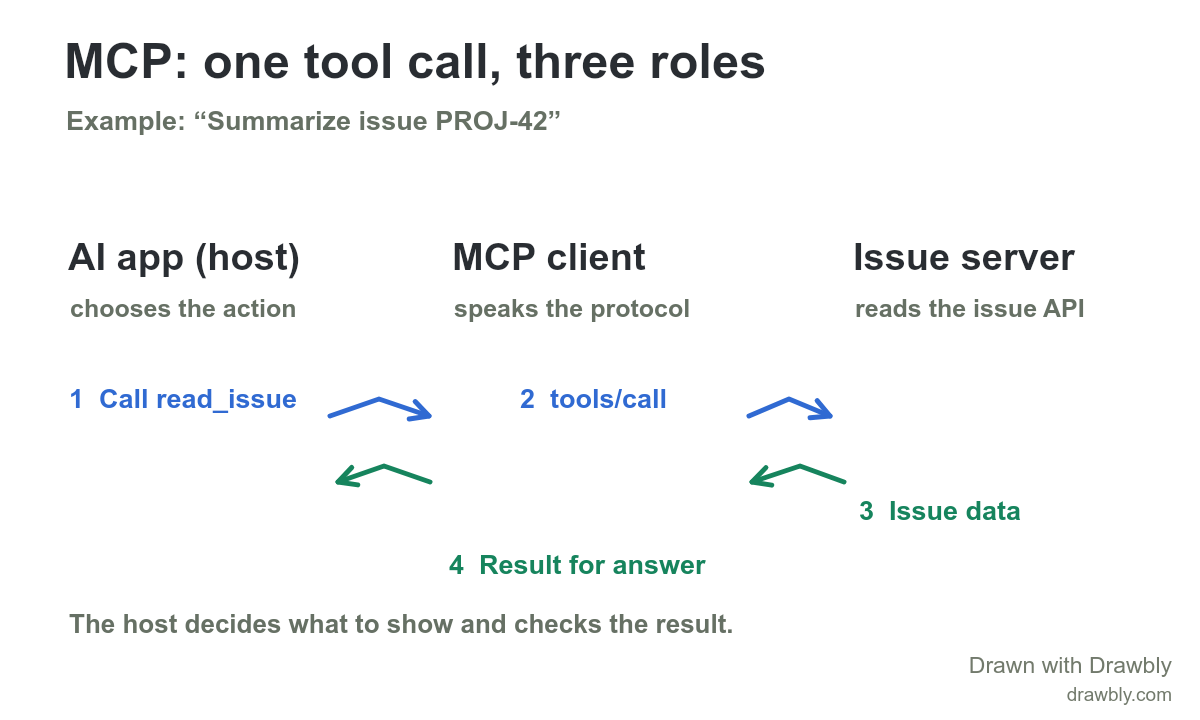
Suppose an engineer asks an AI coding app, “Summarize issue PROJ-42.” The host is the app that receives the question, works with the model and decides which connected capabilities to offer. It creates an MCP client for each MCP server it connects to. That client handles the protocol exchange with its server. The MCP server is a separate program that exposes tools or other context; here it can read an issue through an issue tracker API. A server can run locally or remotely. “Server” describes its protocol role, not its physical location.
This is a closer look at the tool boundary inside an AI agent workflow. The earlier guide shows the model and application loop; this one shows how a particular external tool can be discovered and called. MCP does not prescribe how the host uses a language model or how the model chooses an action.
Follow the issue lookup
- Discover the tool. The app's MCP client can ask the issue server for
tools/list. The server might describe a read-onlyread_issuetool with an input schema requiring an issue ID. The host can make that description available in the conversation. Tool discovery can happen before this particular user question. - Choose and check the call. Given the request, the host may use the model to select
read_issuewith{"id":"PROJ-42"}. The host should check that the tool is available and the arguments and permissions fit the task before invoking it. The model's proposed call is not itself a direct request to the issue tracker. - Send the protocol request. The MCP client sends
tools/callwith the tool name and arguments to the issue server. The MCP data layer uses JSON-RPC; local connections commonly use standard input/output, while remote connections use Streamable HTTP. The protocol message is between client and server, whatever transport carries it. - Return the result. The server reads the issue API and returns a tool result to the client. The host receives it and can give the relevant result to the model to write a summary. The host can also surface a failure or withhold an answer if the lookup did not succeed.
The drawing labels only the live call and response. It leaves the earlier tools/list exchange in the text so the three participants remain readable at phone size. The example names read_issue as a hypothetical tool; it is not a standard MCP tool or a claim that Drawbly connects to an issue tracker.
Where does trust sit?
There are two useful checks to draw on a real integration. First, decide which server and tool the host is allowed to use for this task. Second, treat returned issue text as data, not as new instructions for the host. A tool result can contain surprising or untrusted content even when the protocol exchange succeeds. If you later replace this read-only example with a tool that changes an issue, add an explicit permission or approval step before the side effect.
When debugging, locate the failed boundary. If tools/list does not show the tool, inspect the connection and server capabilities. If tools/call returns an error, inspect its arguments and server/API response. If the call succeeds but the summary is wrong, inspect what the host passed back to the model. These are different problems and need different fixes.
Draw the integration you have
Open the editable diagram and rename the host, server and tool. Keep the client between the host and the server: that is the boundary the diagram is meant to clarify. Label one request and one result before adding more servers. If your system also retrieves documents, the RAG pipeline guide explains that separate question-to-context path.
The MCP architecture overview defines host, client, server, transports and the tool exchange. The tools specification defines tools/list, tools/call and result behavior. This article follows the 2026-07-28 protocol version; implementations using an older version can have a different connection setup.