 Drawbly
Technical explanations · Drawbly
Webhook or polling? Follow one repository push
By Drawbly ·
A webhook sends your server an event when something happens. Polling asks an API, on a schedule, whether anything changed. Both can keep a dashboard current, but they put the waiting in different places. Follow one fictional repository push to see the tradeoff.
One push, two ways to notice it
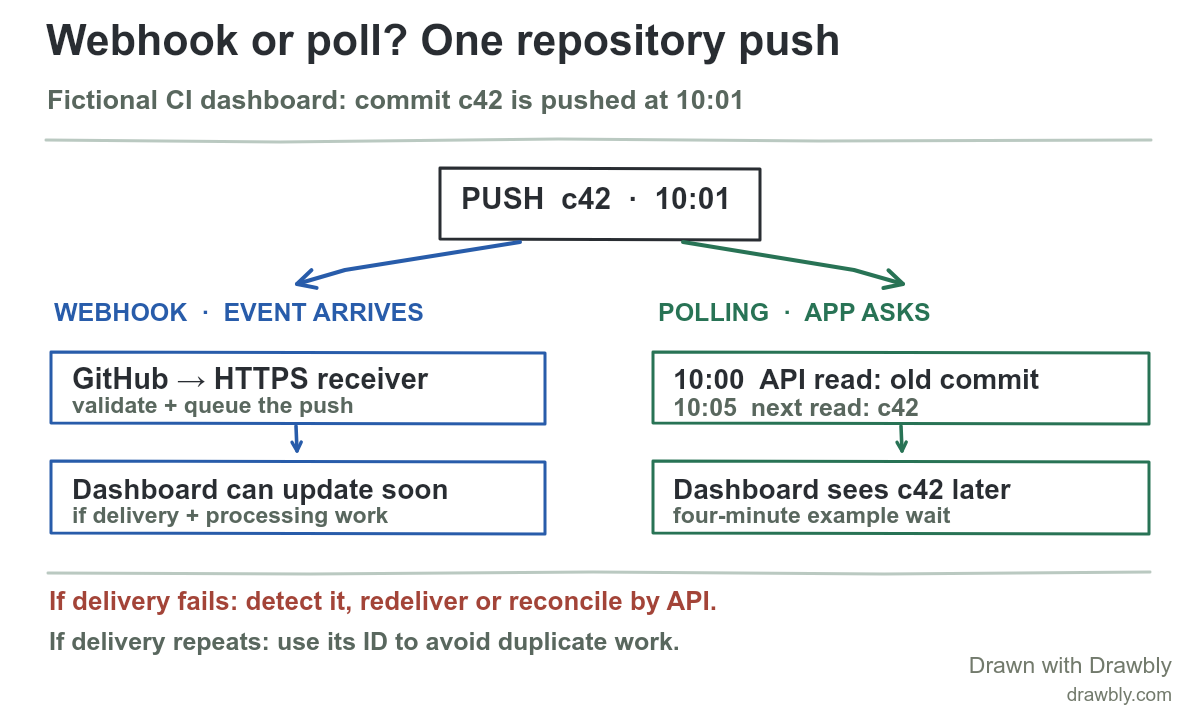
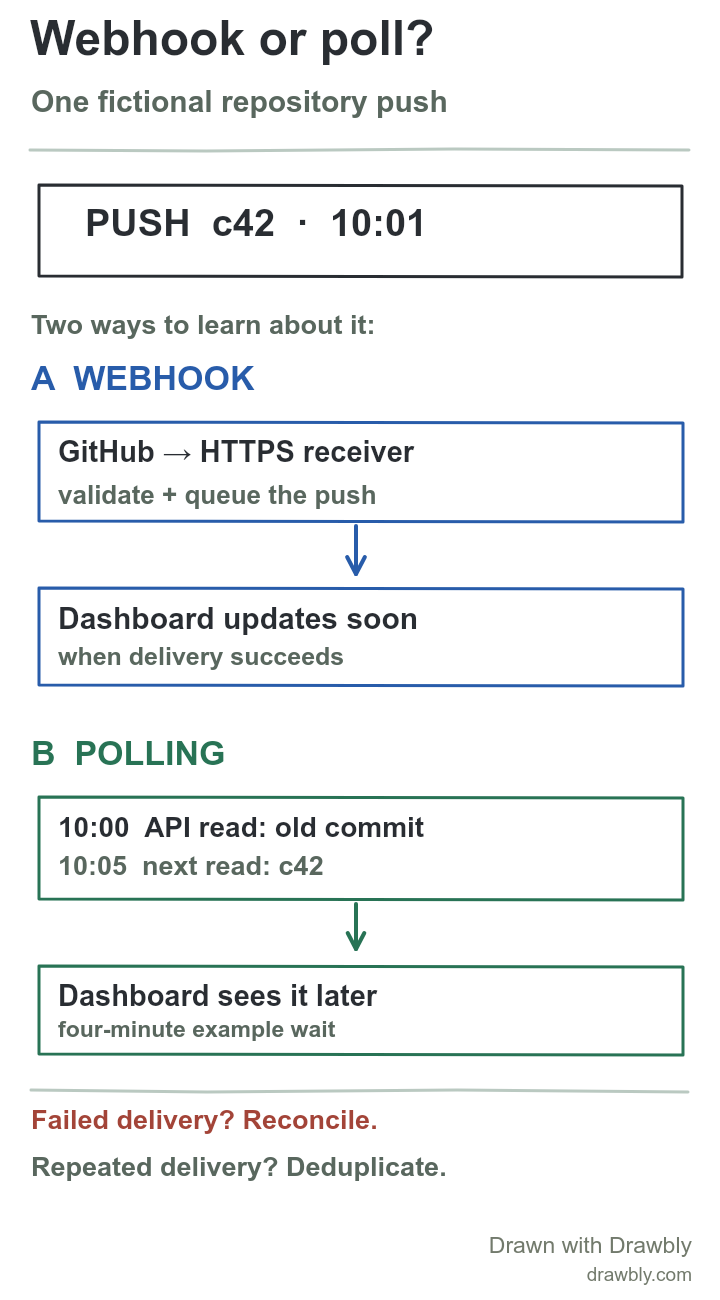
Imagine a small CI dashboard that shows the latest commit for a repository. The dashboard last checked at 10:00. At 10:01 a developer pushes fictional commit c42. The product question is simple: when will the dashboard know, and what happens if its first update fails? This is a model of a GitHub integration, not a live repository or timing measurement.
GitHub describes webhooks as event deliveries to your server, whereas polling repeatedly calls an API. GitHub says webhooks offer near-real-time updates and generally use fewer requests when monitoring many events. It also says an occasional one-off or small-scale read may be better served by the API. The useful distinction is who initiates the next exchange: GitHub after the push, or your app at its next scheduled check.
Path A: react to a delivered event
- The integration subscribes to the repository's
pushevent and exposes an HTTPS endpoint. - After the push, GitHub sends an HTTP request containing the event. The receiver validates the webhook secret and checks the event type before accepting work.
- The receiver records the delivery, responds quickly, and updates the dashboard or queues a job to do it. The display can change soon after the push if delivery and processing succeed.
“Soon” is not an exact latency promise. The network, receiver and job queue all matter. GitHub's webhook best practices say to use HTTPS and a secret, return a 2xx response within 10 seconds, inspect event type/action, and use the delivery identifier to guard against replay or duplicate work. Keep credentials out of the payload URL. A dashboard should make the accepted event and the displayed state separately observable.
Path B: ask on a schedule
Suppose the dashboard asks the API every five minutes. Its 10:00 read sees the old commit; its 10:05 read can discover c42. That four-minute wait follows from this invented schedule, not from a platform service level. If no push occurred, the poll still made a request. For a handful of resources or a manual refresh, that simplicity may be worth it.
Polling also needs discipline. GitHub's REST API guidance recommends a fixed schedule, respecting any x-poll-interval header, using authenticated conditional requests, and requesting only what is needed. Polling faster is not automatically more reliable; it can consume rate limits without solving a wrong query or stale local state.
What if the event is missed or repeated?
Now suppose the webhook receiver returns 500 for c42. The dashboard does not get to claim that it is current. In GitHub's documented behavior, failed deliveries are not automatically redelivered. An operator or a scheduled recovery process must find failed deliveries and request redelivery. A periodic API read can also reconcile the dashboard's displayed commit with the repository's current commit. That reconciliation is an extra design choice, not something a webhook supplies by itself.
A redelivery has the same X-GitHub-Delivery value as the original request. Store that identifier or make the update idempotent so the dashboard does not count the same push twice. The retry and duplicate-order example shows the related idea for a request that may run twice. Do not mark a delivery processed before the durable update or queued job is safe; otherwise a crash can leave a false success record.
Choose for the update you need
Use a webhook first when you need timely updates for many subscribed events and can operate an HTTPS receiver, validation, monitoring and recovery path.
Use an API read or poll for occasional checks, a small set of resources, or a reconciliation pass that checks whether your local view still matches the source.
The two methods can complement each other. A webhook can make the common case fast; a measured reconciliation read can catch a missed update. Start with the user-visible freshness requirement, then record the request cost, failure behavior and recovery ownership. For the drawing, label the actual event, receiver, schedule and place where the dashboard becomes trustworthy. Compare this with the sequence-diagram guide if you need to show message order rather than the two alternative paths.
Open the editable diagram and replace c42 with your own resource change. The portrait file is sized for a vertical explanation. Drawbly helps explain the flow; it does not operate the webhook or API.
GitHub: About webhooks, webhook best practices, failed deliveries, and REST API best practices. Commit c42 and all times are fictional.