 Drawbly
Technical explanations · Drawbly
Sequence diagram vs flowchart: which question are you answering?
By Drawbly ·
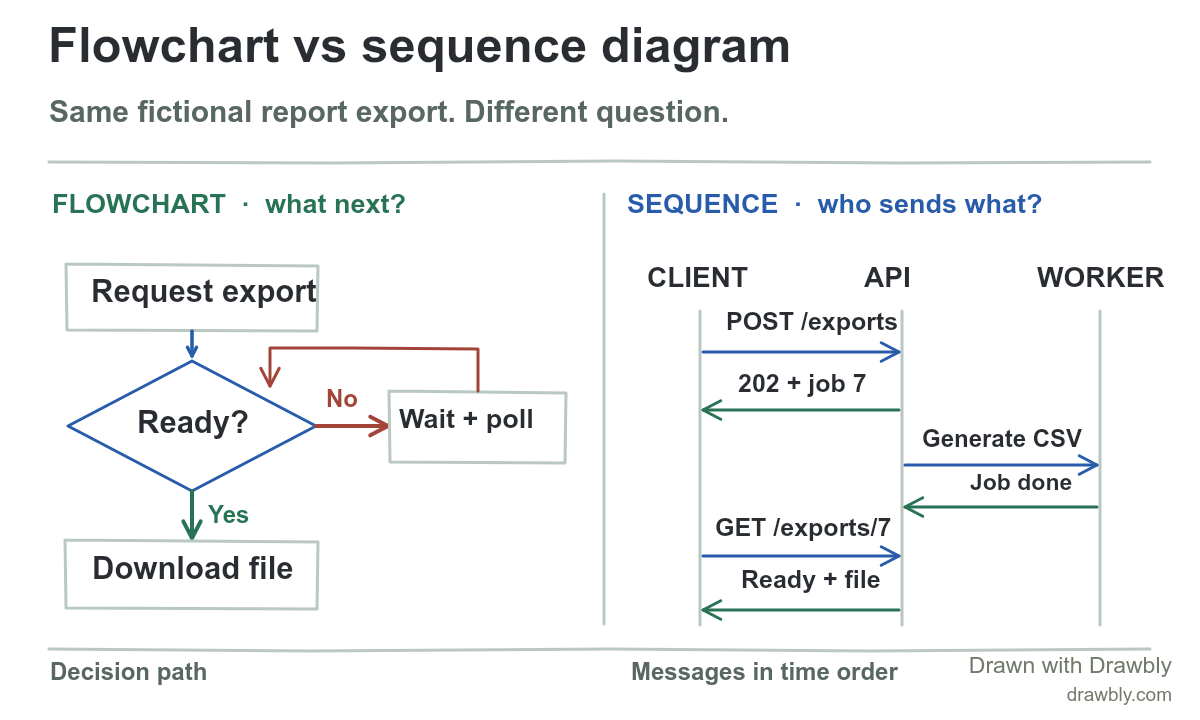
A flowchart shows the choices in a process. A sequence diagram shows messages between participants in time order. You can draw both for the same feature, but they answer different questions. This worked example uses a fictional report export that finishes in the background.
Start with the same concrete event
A person requests a large CSV report. The fictional API accepts the request, returns 202 Accepted with job ID 7, and lets the person check the job's status. A worker generates the file. When the job becomes ready, the client offers a download. The HTTP specification says 202 means processing has been accepted but is not complete; the job-status endpoint and job ID here are this application's design, not built-in HTTP behavior.
Use a flowchart for the next decision
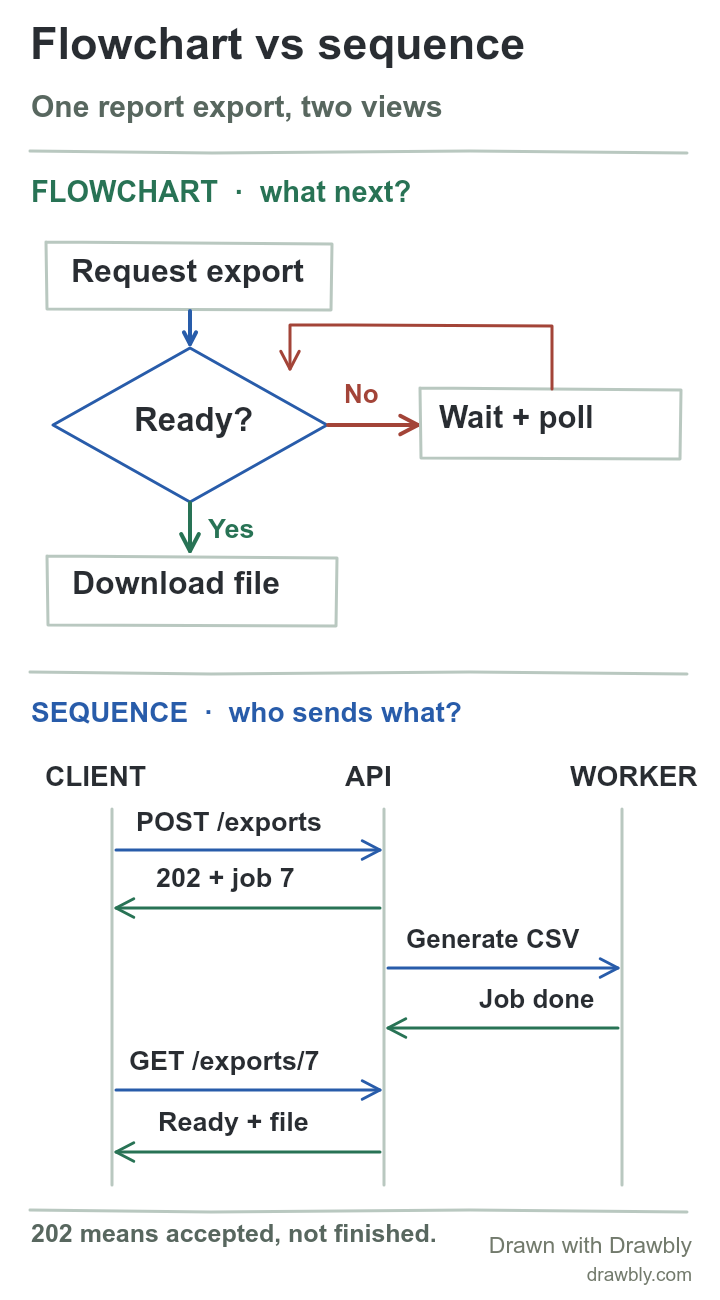
The flowchart follows the user's route: request the export, check whether job 7 is ready, then download if it is. If it is still running, wait and check again. On a real product, add a failure or cancellation branch and a stopping rule so “wait” does not become an endless loop. Put the condition on the branch, not in a caption the reader has to infer.
This view answers questions such as “What happens if the report is not ready?” and “Where do we show an error?” It intentionally does not show which service generates the CSV. Mermaid's flowchart reference describes nodes and directed edges; a decision shape is a common way to make the branch visible. You can keep the sketch simpler when the branch labels already make the choice clear.
Use a sequence view for the handoff
Now read the same case as messages. The client sends POST /exports to the API. The API returns 202 and job ID 7, while a worker performs the report job. Later, the client asks the API for GET /exports/7, and the API reports that the file is ready. Time moves downward; vertical lanes identify who owns each message. This is the part the flowchart hid.
Mermaid's sequence-diagram reference uses participants and message arrows for this kind of exchange. Our illustration is a loose sequence-style sketch made with Drawbly marks. It leaves out storage, queue acknowledgements, authentication and repeated polls because those details are not needed to explain this handoff. If one of those boundaries is the point of your review, draw it explicitly rather than assuming the reader will fill it in.
Choose the view that answers the review question
Choose the flowchart when the question is about conditions, alternate paths, user choices or termination. Ask a teammate to find the “still running” and “ready” branches without narration.
Choose the sequence view when the question is about timing, ownership, requests and responses across components. Ask a teammate to identify who creates the job and who checks its completion.
A system can need both views. Do not force every decision and every service into one crowded drawing. If an architectural change moves export generation from the API to a worker, update the sequence view and the architecture diagram; the user's ready/not-ready flow may still be the same.
Draw the smallest honest version
Open the editable comparison. Replace the fictional report with a process your team actually owns. Write one question above each half before adding marks. Keep the first diagram to one decision and the second to the messages that cross a real boundary. The first-diagram guide shows the canvas controls; the portrait source can be opened from Drawbly's Files menu.
Mermaid flowchart syntax, Mermaid sequence diagram syntax, and RFC 9110 §15.3.3 on 202 Accepted. The report export, endpoints and job result are fictional.