Drawbly notebook
Start with three labels, not a wall of text.
By Drawbly ·
Try this constraint: explain one relationship with three labels and two arrows. It forces you to choose what the viewer should notice.
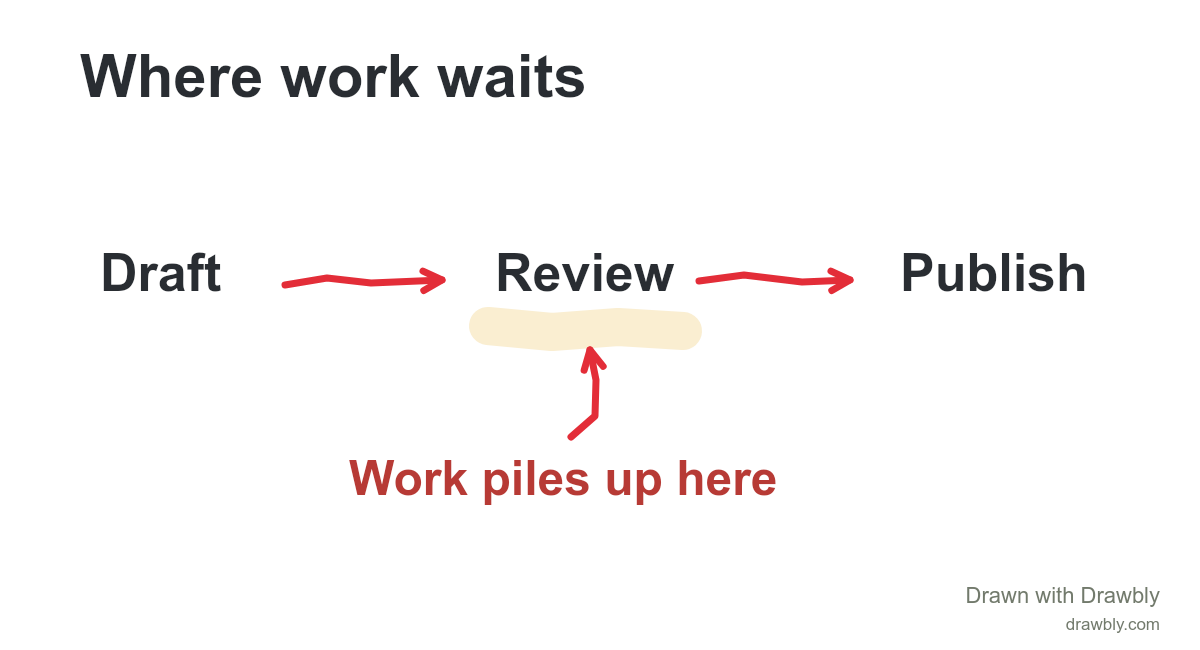
Suppose you want to explain why publishing more drafts has not increased the number of finished articles. You could describe every step, every person and every exception. But if the point is that review is the bottleneck, most of that detail can wait.
Choose the sentence before the shapes
Write the claim in ordinary language: “More drafts are waiting because review is slower than drafting.” Now choose three labels: Draft, Review, Publish. These labels are not a full process map. They are enough context for this particular claim.
Make the important difference visible
In Drawbly, place the labels with Text, then connect them with Arrow. Highlight Review and add a few small marks before it to suggest work waiting. A short note, “waiting here,” can remove ambiguity. Do not rely on color alone: the position of the queue and the label should also explain it.
There is no need to draw perfect boxes. The connection between the labels matters more than matching corners. Keep a clear gap between each arrowhead and its destination so the direction is easy to follow.
Remove one thing
Now look for a detail you can remove without changing the conclusion. An extra icon, a second accent color or a sentence repeating the title may be doing no useful work. Delete it and compare. If the meaning becomes less clear, Undo brings it back.
Test the diagram without your explanation
Export a PNG and view it at the size someone will actually see. Ask yourself three concrete questions: Where does reading start? What is the highlighted part? What should the viewer conclude? If the diagram depends on a spoken paragraph, add one precise label or narrow the claim.
Know when the constraint is too small
Three labels are a starting exercise, not a rule for every subject. A branching decision or feedback loop may need more. Add the next element only when it explains something the existing marks cannot. For a sequence that benefits from gradual reveal, try a drawing replay.
Ready to make your own? The first-diagram guide covers the actual canvas controls.